By simply asking AI like ChatGPT or Claude to "Create a quiz about...", you can generate study packs ready to be imported into Sokqa.
Follow these 3 easy steps to create your personal study content!
If you want to start right away, use the button above.
Send the prompt (instruction text) to an AI.
Copy the generated text (JSON format).
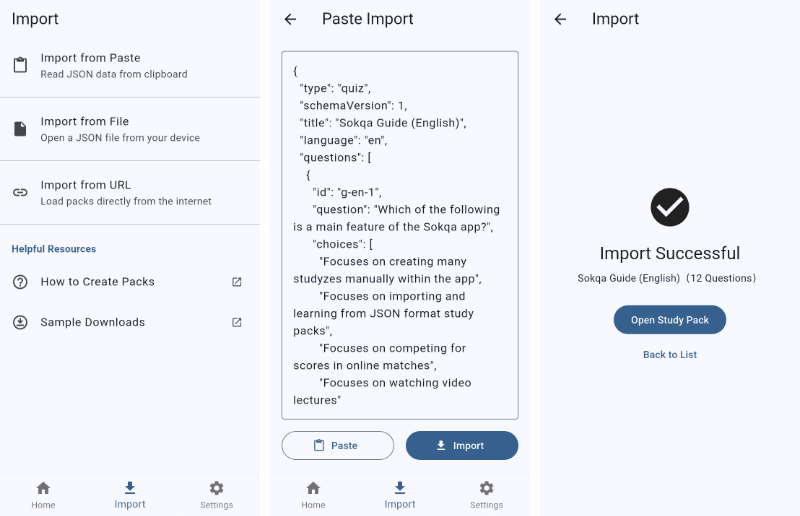
Import it using "Paste JSON" in the Sokqa app.
🔰 [Beginners] Let's Make One First!
Start by using the simple "Standard Prompt". It has no extra settings, making it easy for anyone to create content without errors.
1. Create 4-Choice Quizzes
Use this prompt to create 4-choice questions for vocabulary, exams, or trivia. Copy and paste the text below into an AI.
Please create 5 multiple-choice questions on the following theme and output them in the specified JSON format.

Theme: [★ Enter the theme you want to learn (e.g., Frequently used Spanish words) ★]
Language: en

【Format to strictly follow】
{
  "id": "★ Any alphanumeric string (e.g., pack_1) ★",
  "type": "quiz",
  "schemaVersion": 1,
  "title": "★ Title of the study pack ★",
  "language": "en",
  "questions": [
    {
      "id": "q1",
      "question": "★ Question text ★",
      "choices": ["Choice 1", "Choice 2", "Choice 3", "Choice 4"],
      "answerIndex": 0,
      "explanation": "★ Explanation text ★"
    }
  ]
}

【Rules】
- The 'choices' array must contain exactly 4 items.
- The 'answerIndex' must be a number from 0 to 3 (0 represents the first choice).
- Distribute answerIndex across the 5 questions so one position does not appear too often. Do not keep using the same answer position repeatedly.
- Assign a unique alphanumeric string to each question's 'id' (e.g., "q1", "q2", "q3"...).
- The output must be pure text starting with { and ending with }. Never use markdown formatting (such as ```json).
- To prevent JSON syntax errors, if you use double quotes (") within a string, always escape them (\").
- Do not use line breaks (\n) in the middle of a string. Even if the explanation is long, output it in a single line.
2. Document Mode (Reading aloud)
Use this prompt when you want the app to automatically read aloud long texts, speeches, or news articles.
Please convert the following theme/text into Sokqa's document mode JSON format.
Split the text into individual sentences or logical phrases within the "documents" array.

Theme: [★ Enter the text or theme here (e.g., Steve Jobs' commencement speech) ★]
Language: en

【Format to strictly follow】
{
  "id": "★ Any alphanumeric string (e.g., doc_pack_1) ★",
  "type": "document",
  "schemaVersion": 1,
  "title": "★ Enter the title ★",
  "language": "en",
  "documents": [
    {
      "id": "doc1",
      "text": "★ 1st sentence ★"
    },
    {
      "id": "doc2",
      "text": "★ 2nd sentence ★"
    }
  ]
}

【Rules】
- The output must be pure text starting with { and ending with }. Never use markdown formatting (such as ```json).
- To prevent JSON syntax errors, if you use double quotes (") within a string, always escape them (\").
- Do not use line breaks (\n) in the middle of a string. Even if the text is long, output it in a single line.
Importing the JSON into the App
Follow these steps to load the AI-generated text into the Sokqa app.
Copy the entire text generated by the AI (from the opening { to the closing }).
Open the Sokqa app, tap the "+" button or import button on the pack list screen, and select "Paste JSON".
In Sokqa, you can set a dedicated "tts" object separately from the display text.
If the smartphone's Text-to-Speech (TTS) mispronounces words or sounds too fast, adjusting the JSON text as follows can make the playback much more natural.
Add pauses only when needed: Natural English usually works as-is. Only adjust punctuation when the default TTS sounds rushed or unclear. Example: Keep natural English first, and only add a pause if the default reading is hard to follow.
Add spaces to acronyms: If "AI" is read as a single word (like "eye"), add spaces between the letters instead. Example: ChatGPT → C h a t G P T, AI → A I
Spell out special terms: For words that are easily misread, spell them out exactly as they sound to ensure correct pronunciation.
Multilingual TTS and Language MixingThis is one of Sokqa's biggest strengths. It is not limited to Japanese and English. If the voice data exists on the device, many other languages can be used as well.
Sokqa can read multiple languages inside one pack. This is useful not only for users outside Japan, but also for Japanese learners studying Chinese, Korean, French, German, and other languages beyond English.
Coverage: the top-level language can be ja, en, zh, fr, ko, de, and more
Requirement: the target language must be installed as voice data on the device
Recommended: use field-level settings first, then inline tags only where needed
Quiz / DocumentStart with field-level language assignment
When you ask AI to generate JSON, field-level settings are usually more stable than placing many tags inside the sentence. Keys such as questionLanguage, choicesLanguage, and explanationLanguage make the intent clearer. In document mode, the base language for text is specified with textLanguage.
If you need to switch only one word or phrase inside an explanation or document sentence, use inline tags such as [fr-FR] or [ja-JP]. After a tag appears, that language stays active until the next tag.
[fr-FR]bonjour[en-US] means hello.
CommonPriority order
If inline tags are present, they override the active language. When there is no inline tag, Sokqa resolves the base language in the following order.
Highest priority: inline tags such as [en-US]
Next: per-question or per-document language settings such as explanationLanguage and textLanguage
Next: the pack-level language
Final fallback: the device default language
In other words, if no per-item setting exists, Sokqa uses the pack-level language, and if that still does not resolve, it falls back to the device default language.
CommonNo sound? Check these first
OS support: actual playback depends on whether Android or iOS supports that language.
Voice data: if the voice data for that language is missing, the app may stay silent.
What to do: open your device's Text-to-Speech settings and confirm the language pack is installed.
TTS Optimized High-Quality Prompts
These prompts instruct the AI to apply the optimization rules above, generating high-quality audio data from the start. Use "Standard" when you do not need multiple languages, and switch to "Multilingual" only when you want mixed-language playback.
This is the recommended default when you do not need multilingual playback.
▶ For 4-Choice Quizzes
Please create 5 multiple-choice questions on the following theme and output them in the specified JSON format, optimized for Sokqa's Text-to-Speech (TTS) engine.

Theme: [★ Enter the theme you want to learn (e.g., SAT Vocabulary) ★]
Language: en

【Format to strictly follow】
{
  "id": "★ Any alphanumeric string (e.g., pack_1) ★",
  "type": "quiz",
  "schemaVersion": 1,
  "title": "★ Title of the study pack ★",
  "description": "★ Brief summary of this study pack ★",
  "globalTags": ["★ Global Tag 1 ★", "★ Global Tag 2 ★", "★ Global Tag 3 ★"],
  "language": "en",
  "questions": [
    {
      "id": "q1",
      "question": "What does "CPU" stand for?",
      "choices": [
        "Central Processing Unit",
        "Control Program Unit",
        "Core Process Utility",
        "Central Program Utility"
      ],
      "answerIndex": 0,
      "explanation": "CPU refers to the main processing unit of a computer.",
      "tts": {
        "questionText": "What does, C P U, stand for?"
      }
    }
  ]
}

【Rules for TTS Object】
- Set 'globalTags' as an array of strings, with about 3 keywords related to the whole study pack.
- Make this output self-contained. Do not rely on rules from other sections. Build correct JSON using this block alone.
- Keep the meaning aligned between the display fields and the TTS fields. Do not change facts, answers, or explanations in questionText / choiceTexts / explanationText.
- The tts object is optional. Output it only when some field actually needs speech correction.
- Omit questionText / choiceTexts / explanationText only when the device's default TTS can already read that field naturally. If there is any risk of unnatural pronunciation or poor listenability, keep the TTS field and correct it.
- Decide omission per field, not per tts object. Check questionText / choiceTexts / explanationText one by one, output only the fields that are actually needed, and omit the rest.
- Adjust the text in the "tts" object to sound natural when read by a smartphone's Text-to-Speech engine.
- For English text, prefer the original sentence as-is. Add punctuation or pauses only when they clearly improve listenability.
- When you want an acronym or abbreviation read letter by letter, add spaces between the letters (e.g., A I, U S A, P R).
- Remove unnecessary conjunctions and adjust sentences into a conversational tone that is easy to understand by ear alone.
- If there is any uncertainty about kanji readings, proper nouns, abbreviations, symbols, numbers, or pause positions, do not omit TTS. Add it and correct the reading. If unsure, keep TTS.
- On the other hand, if question / choices / explanation are already natural enough as-is, do not output duplicate TTS fields with the same content.
- If questionText would be the same as question and the device TTS can already read it naturally, omit questionText.
- Output tts.choiceTexts only when individual choices need TTS correction. choiceTexts must be an array of exactly 4 strings in the same order as choices.
- Do not include choice numbers in choiceTexts. The app adds numbering according to the user's setting.
- If the choices array already reads naturally, omit choiceTexts.
- Do not output answerText by default. Use answerText only as an optional field for special cases that need a non-standard correct-answer readout.
- If explanationText would be the same as explanation and the device TTS can already read it naturally, omit explanationText.
- If none of questionText / choiceTexts / explanationText are needed, do not output the tts object at all.
- Keep exactly 4 choices, and keep answerIndex in the 0 to 3 range.
- Distribute answerIndex across the 5 questions so one position does not appear too often. Do not keep using the same answer position repeatedly.
- Before outputting JSON, check each question for: 4 choices, correct answerIndex, aligned meaning between display and TTS, and no unnecessary duplicate TTS fields.
- Follow the standard JSON rules for other fields (e.g., exactly 4 choices, output only the JSON object starting with {).
Before copying the Document prompt, you can switch between Standard and Multilingual here as well.
▶ For Document Mode
Please convert the following theme/text into Sokqa's document mode JSON format, optimized for Text-to-Speech (TTS).
Split the text into individual sentences or logical phrases within the "documents" array.

Theme: [★ Enter the text or theme here (e.g., Steve Jobs' commencement speech) ★]
Language: en

【Format to strictly follow】
{
  "id": "★ Any alphanumeric string (e.g., doc_pack_1) ★",
  "type": "document",
  "schemaVersion": 1,
  "title": "★ Enter the title ★",
  "description": "★ Brief summary of this study pack ★",
  "globalTags": ["★ Global Tag 1 ★", "★ Global Tag 2 ★", "★ Global Tag 3 ★"],
  "language": "en",
  "documents": [
    {
      "id": "doc1",
      "text": "Today, I want to share an important message with you."
    },
    {
      "id": "doc2",
      "text": "Stay hungry, stay foolish. is a phrase you should remember.",
      "tts": {
        "text": "Stay hungry, stay foolish, is a phrase you should remember."
      }
    }
  ]
}

【Rules for TTS Object】
- Set 'globalTags' as an array of strings, with about 3 keywords related to the whole study pack.
- Make this output self-contained. Do not rely on rules from other sections. Build correct JSON using this block alone.
- Keep the meaning aligned between text and tts.text. You may improve readability with punctuation or tags, but do not change the actual content into a different sentence.
- The tts object is optional. For each document item, output it only when speech correction is actually needed.
- Omit tts.text only when the device's default TTS can already read text naturally. If there is any risk of awkward pronunciation or poor listenability, keep tts.text and correct it.
- Pay special attention to words whose readings change by context, including kanji with multiple possible readings. If a phrase such as "実を言うと" or "鏡を見て" may be misread, correct the reading explicitly in tts.text.
- Adjust the text in the "tts" object to sound natural when read by a smartphone's Text-to-Speech engine.
- For English text, prefer the original sentence as-is. Add punctuation or pauses only when they clearly improve listenability.
- When you want an acronym or abbreviation read letter by letter, add spaces between the letters (e.g., A I, U S A, P R).
- Remove unnecessary conjunctions and adjust sentences into a conversational tone that is easy to understand by ear alone. Do not insert commas mechanically at every phrase boundary.
- If there is any uncertainty about kanji readings, proper nouns, abbreviations, symbols, numbers, or pause positions, do not omit TTS. Add it and correct the reading. If unsure, keep TTS.
- On the other hand, if text is already natural enough as-is, do not output duplicate tts.text with the same content.
- Keep tts.text as a minimal-difference correction. Do not rewrite the whole sentence into kana or add excessive punctuation across the entire sentence unless that is truly necessary.
- Decide per document item whether to use display text as-is or add tts.text for correction. If no correction is needed, omit the tts object for that document item.
- Before outputting JSON, check each document item for: preserved meaning, TTS only where needed, no unnecessary duplicate tts.text, corrected context-dependent readings where needed, and no excessive punctuation or kana conversion.
- The output must be pure text starting with { and ending with }. Never use markdown formatting (such as ```json).
Use this only when you want mixed-language playback such as English and Japanese in the same pack.
▶ For 4-Choice Quizzes
Please create 5 multiple-choice questions on the following theme and output them in a JSON format compatible with Sokqa's multilingual Text-to-Speech (TTS).

Theme: [★ Enter the theme you want to learn (e.g., English vocabulary with Japanese questions and English choices) ★]
Language: en

【Format to strictly follow】
{
  "id": "★ Any alphanumeric string (e.g., pack_1) ★",
  "type": "quiz",
  "schemaVersion": 1,
  "title": "★ Title of the study pack ★",
  "description": "★ Brief summary of this study pack ★",
  "globalTags": ["★ Global Tag 1 ★", "★ Global Tag 2 ★", "★ Global Tag 3 ★"],
  "language": "en",
  "questions": [
    {
      "id": "q1",
      "question": "Which Spanish word means "apple"?",
      "choices": ["Manzana", "Libro", "Casa", "Escuela"],
      "answerIndex": 0,
      "explanation": ""manzana" means "apple" in Spanish.",
      "tts": {
        "choicesLanguage": "es-ES",
        "explanationText": "[es-ES]manzana[en-US] means apple in Spanish."
      }
    }
  ]
}

【Multilingual TTS Rules】
- Make this output self-contained. Do not rely on rules from other sections. Build correct JSON using this block alone.
- For each question, inspect the base language of question / choices / explanation separately. Decide per field, not once for the entire question.
- 1. If a field is entirely in the same language as the pack-level "language", omit the corresponding *Language field.
- 2. If a field is entirely in one different language, add the corresponding *Language field.
- 3. If a field mixes multiple languages, switch languages inside the corresponding *Text field using inline tags such as [en-US] or [ja-JP].
- In short: add questionLanguage / choicesLanguage / explanationLanguage only where needed. Do not mechanically output all fields on every question.
- Use inline tags only when part of one field needs language switching.
- First, make the display fields such as question and explanation natural in the pack-level "language". Do not leave foreign helper words, filler words, or decorative loanwords in display text unless they are actually part of the learning target.
- Keep foreign words in display text only when the word or phrase itself should be studied, when an original quotation is necessary, or when it must remain as a proper noun.
- If a foreign helper word appears in display text unnecessarily, fix the display text first in the pack language before deciding how TTS should read it.
- On the other hand, if that foreign word itself is the learning target, or if the user should hear the original pronunciation, keep it in the original language or use inline tags.
- The priority order is: inline tags > field-level language settings > pack-level language.
- Keep the meaning aligned between the display fields and questionText / choiceTexts / explanationText. Do not change the correct answer or explanation in the TTS fields.
- If questionText would be the same as question and the device TTS can already read it naturally, do not output questionText.
- If choicesLanguage alone makes the choices read naturally, omit choiceTexts.
- Output choiceTexts only when individual choices need TTS correction. choiceTexts must contain exactly 4 items in the same order as choices.
- Do not put choice numbering or surrounding phrasing in choiceTexts. If only part of a choice needs another language, use inline tags inside that choiceTexts item.
- If explanationText would be the same as explanation and the device TTS can already read it naturally, do not output explanationText.
- Do not output answerText by default. Use answerText only as an optional field for special cases that need a non-standard correct-answer readout.
- Omit TTS only when that field is already naturally readable by the device TTS. If omission would sound awkward, output only that TTS field and correct it.
- If none of questionText / choiceTexts / explanationText are needed, do not output the tts object at all.
- Before outputting JSON, choose the minimum structure for each field: use display text as-is / add only *Language / add *Text / use inline tags.
- Distribute answerIndex across the 5 questions so one position does not appear too often. Do not keep using the same answer position repeatedly.
- Before outputting JSON, check each question for: 4 choices, correct answerIndex, aligned meaning between display and TTS, minimum language settings, and no unnecessary duplicate TTS fields.
- Follow the standard JSON rules for other fields: exactly 4 choices, answerIndex from 0 to 3, and output only the JSON object starting with { and ending with }.
Before copying the Document prompt, you can switch between Standard and Multilingual here as well.
▶ For Document Mode
Please convert the following theme/text into Sokqa's document mode JSON format for multilingual Text-to-Speech (TTS).
Split the text into individual sentences or logical phrases within the "documents" array.

Theme: [★ Enter the text or theme here (e.g., study material mixing Japanese explanations and English phrases) ★]
Language: en

【Format to strictly follow】
{
  "id": "★ Any alphanumeric string (e.g., doc_pack_1) ★",
  "type": "document",
  "schemaVersion": 1,
  "title": "★ Enter the title ★",
  "description": "★ Brief summary of this study pack ★",
  "globalTags": ["★ Global Tag 1 ★", "★ Global Tag 2 ★", "★ Global Tag 3 ★"],
  "language": "en",
  "documents": [
    {
      "id": "doc1",
      "text": "This sentence is entirely in English."
    },
    {
      "id": "doc2",
      "text": "Esta frase esta completamente en espanol.",
      "tts": {
        "textLanguage": "es-ES"
      }
    },
    {
      "id": "doc3",
      "text": "This is an explanation that includes 重要な語句.",
      "tts": {
        "text": "[en-US]This is an explanation that includes [ja-JP]重要な語句[en-US]."
      }
    }
  ]
}

【Multilingual TTS Rules】
- Make this output self-contained. Do not rely on rules from other sections. Build correct JSON using this block alone.
- First, set the pack-wide base language with the top-level "language" field.
- For each document item, first inspect the display text and decide its base-language pattern. Use these 3 choices.
- 1. If the text is entirely in the same language as the pack-level "language", omit tts.textLanguage.
- 2. If the entire text is in one different language, add tts.textLanguage for that document item only.
- 3. If the text mixes multiple languages, switch languages inside tts.text with inline tags such as [en-US] and [ja-JP].
- In short: same as pack language = no textLanguage, entirely another language = add textLanguage, mixed language = use inline tags.
- First, make the display text natural in the pack-level "language". Do not leave foreign helper words, filler words, or decorative loanwords in display text unless they are actually part of the learning target.
- Keep foreign words in display text only when the word or phrase itself should be studied, when an original quotation is necessary, or when it must remain as a proper noun.
- If a foreign helper word appears in display text unnecessarily, fix the display text first in the pack language before deciding how TTS should read it.
- Keep original-language tags only when that foreign word or phrase itself is the learning target, or when the original pronunciation should be heard.
- Do not add unnecessary textLanguage fields. Add them only to the document items that require them.
- If the whole text is in another language and the display text itself is already fine for speech, output only tts.textLanguage and omit tts.text.
- Output tts.text only when speech optimization is actually different from the display text. Do not output a duplicate tts.text when it is exactly the same as text.
- The priority order is: inline tags > textLanguage > pack-level language > device default language.
- Separate display text and speech-optimized tts.text when needed, but keep the meaning aligned. Do not replace it with a different sentence.
- Omit TTS only when the device TTS can already read the text naturally. If omission would sound awkward, output tts.text and correct it.
- Pay special attention to context-dependent readings, including kanji with multiple possible readings. If the device may misread the word, correct it explicitly in tts.text.
- Before outputting JSON, check each document item and decide one of these only once: no extra field / add textLanguage / use inline tags.
- Before outputting JSON, check each document item for: aligned meaning between display and TTS, minimum language settings, no unnecessary duplicate tts.text, and corrected context-dependent readings where needed.
- Output must be pure text starting with { and ending with }. Never use markdown formatting such as ```json.
Troubleshooting & Manual Fixes
If you encounter an error during import, check for the following common causes.
Common Errors
The choices array has 3 or 5 items → It must have exactly 4.
answerIndex is set to 4 → If the 4th choice is correct, specify 3.
There is a trailing comma ( , ) after the last item → Remove the extra comma (,) immediately preceding a closing brace } or bracket ].
Multilingual TTS stays silent → Check whether your device supports that language and whether the required voice data is installed in Text-to-Speech settings.
Sokqa JSON Format Specification
This explains the structure of the JSON data imported into Sokqa and the meaning of each tag.
You can run the app with just the bare minimum "Required Tags", or add "Optional Tags" for a richer experience.
Required Tags (Bare minimum to run)
Tags that are absolutely necessary for the app to recognize and run the study pack.
schemaVersion : Always specify 1.
type : Specifies the study format (quiz = 4-choice, document = reading aloud).
id : A unique ID assigned to the entire pack or each question/document (e.g., pack_1, q1). Must be alphanumeric and unique.
title : The title of the study pack. Displayed on the app's list screen.
language : The language code (e.g., en, ja, zh, fr, ko, de). It also works as the base language when no per-item override is set.
[Required for 'quiz' (4-choice)]
questions : A list (array) of questions.
question : The question text (displayed on the screen).
choices : The choices. You must provide exactly 4 choices.
answerIndex : The correct answer number. Specify a number from 0 to 3 (0 is the 1st choice, 3 is the 4th).
[Required for 'document' (Reading aloud)]
documents : A list (array) of sentences. Split by meaning or one sentence at a time.
text : The text of the sentence (displayed on the screen).
Optional Tags (For a higher quality experience)
Not required, but adding these allows you to fully utilize the app's features.
globalTags : A list (array) of tags for the whole study pack (recommended). Intended for searching and filtering packs in the pack list. Official packs include it, but user-made packs can run without it.
description : A short summary of the whole study pack. Writing 1 to 2 concise sentences about the content, target learner, or purpose makes the pack easier to understand.
explanation (quiz only) : Explanation text for the question. Displayed on screen when answering correctly/incorrectly.
tts (quiz / document) : An object specifying text exclusively for Text-to-Speech (TTS). Use this only when you need a better spoken form than the display text, such as explicit spellings, corrected readings, or small pause adjustments.
For multilingual TTS, inline tags have the highest priority. If no inline tag is present, Sokqa uses the field-level language as the base, and finally falls back to the pack-level language.
[tts structure for 'quiz']
questionText: Question text for reading aloud
choiceTexts: Per-choice TTS corrections. Use exactly 4 items in the same order as choices, without choice numbering.
answerText: Optional field used only for special non-standard correct-answer readout. Usually omit it.
explanationText: Explanation text for reading aloud
[tts structure for 'document']
textLanguage: Base language for the document text
text: Document text for reading aloud
tags (quiz / document) : A list (array) of tags to attach to the question or sentence (advanced). This can be used for tag search and filtering study targets within the app (e.g., ["Vocabulary", "TOEIC"]).
 Sokqa
Sokqa