
If your contact form has a high abandonment rate, replacing it with a chatbot in one go is risky. A staged migration — where chat becomes the primary path while the form stays as fallback — is safer and easier to measure. This guide walks through the three-phase approach, what to decide before migrating, and which metrics tell you whether the migration is working.
What you will learn
- Why contact forms see high abandonment and how chatbots address the root causes
- A three-phase migration pattern with minimal risk
- Five decisions to make before starting
- Which metrics to track weekly after launch
Why staged migration is the safest approach
- Removing the form entirely is high-risk — Some users prefer forms for complex or sensitive inquiries. Cutting the form forces them into a channel they may not trust yet.
- Chat-first with form fallback covers both ends — “Try chat first, use the form if you need more detail” reduces drop-off while preserving flexibility.
- Data-driven downsizing — Watch chat completion rates and form usage trends before deciding whether to reduce or retire the form.
Early decision criteria
- Good candidate for early migration: repetitive questions, visible form abandonment, or strong demand for instant answers
- Move carefully: many requests involve contracts, detailed estimates, or personal data handling
- Do not rush full replacement: if most leads are high-value and require long context, keep the form available longer
Why contact forms lose users
Reason 1: Too many fields
Name, email, phone, company, department, title, inquiry type, message body — long forms drive abandonment, especially on mobile. If mobile drop-off is disproportionately high, field count is almost certainly the cause.
Reason 2: Users don’t know what to write
A blank “Message” textarea with no guidance leaves users uncertain about what to include and how much detail is expected. This uncertainty causes them to leave before submitting.
Reason 3: No indication of response time
When the confirmation screen says only “We’ll get back to you soon,” urgency creates anxiety. A chatbot that responds instantly removes this friction.
Reason 4: The form is hard to find
If the contact link is buried in the footer or requires a page navigation, users with a question abandon before reaching it. A chat widget is visible on every page, so users can ask the moment the question arises.
Three-phase migration
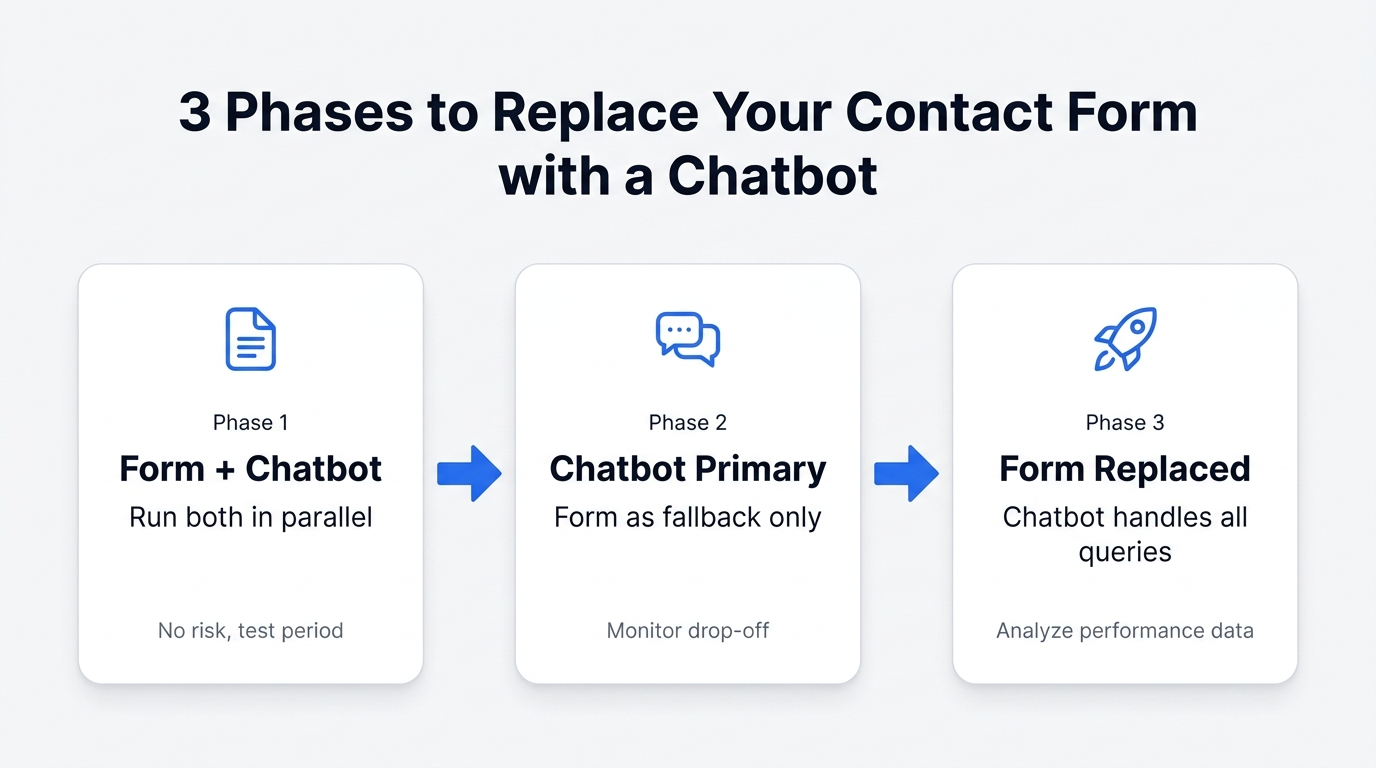
Phase 1: Add chat alongside the form (no changes to the form)
Deploy the chatbot without modifying the existing form.
Actions
- Embed the chat widget on your contact page
- Set the widget greeting to “Have a quick question? Try our chat.”
- Add a text banner above the form: “For faster answers, use the chat below.”
Goal of this phase
- Observe how many visitors use chat vs. the form
- Check whether form submission volume changes
Run Phase 1 for 2–4 weeks.
Phase 2: Make chat the primary path (reduce the form)
Once chat usage is confirmed, reposition it as the primary interaction.
Actions
- Place the chat widget above the fold on the contact page
- Move the form below the fold or reduce its fields
- Add an in-chat message: “Need to send detailed information? Use our form.”
Example field reduction
| Before | After |
|---|---|
| Name, email, phone, company, department, title, type, message | Name, email, message |
During this phase, compare “chat completion rate” with “form submission quality” to assess whether chat is handling the load.
Phase 3: Position the form as a chat auxiliary
When chat resolution rate is consistently high, the form becomes a secondary channel.
Actions
- Make chat the only visible contact method on the page
- Provide a form link only inside the chat flow for complex cases
- Keep the form URL functional but remove standalone navigation to it
Caution
- Do not fully retire the form until chat resolution rate exceeds 80%
- If legal or compliance requirements mandate a form, keep it accessible but de-emphasize it
Five decisions to make before migrating
Define these before Phase 1 begins:
- Scope of chat coverage — Will the chatbot handle all inquiries or only the top 5–10 most common questions?
- Human escalation path — Where does the user go when chat cannot resolve their question? (Form, phone, email, live agent)
- Operating hours — Is the chatbot available 24/7? When is human support available?
- Target metrics — What numbers define success? (Chat start rate, completion rate, ticket volume reduction)
- Phase transition criteria — What conditions trigger the move from Phase 1 to Phase 2? (e.g., chat completion rate above 70%, form usage below 30%)
Metrics to track after launch
Review these weekly to assess migration health.
Primary metrics
| Metric | What it tells you | Target range |
|---|---|---|
| Chat start rate | % of page visitors who open the chat | 5–15% |
| Chat completion rate | % of chat sessions that reach a resolution | 60–80% |
| Form submission trend | Change in weekly form submissions | Gradual decline |
| Total inquiry volume | Chat + form combined | Stable or declining |
| Inquiry quality | Are chat inquiries actionable? Are form inquiries complete? | Improving |
Warning signals
- High start rate but low completion → Scenarios may be too complex, or answers are insufficient. Simplify branching and improve response content.
- Form volume drops AND total volume drops → Users may be abandoning entirely instead of switching to chat. Check the “Did this help?” response rate inside the chatbot.
- Low-quality chat inquiries → Users may not understand the options. Revisit the button labels and question wording in your scenarios.
FAQ
Can I keep the form as the main channel and just add chat as a supplement?
Yes, but chat adoption will be limited as long as the form dominates the page. At minimum, add a visible banner near the form pointing users to chat for faster answers.
Will adding a chatbot increase overall inquiry volume?
It can. Chatbots lower the barrier to contact, which means people who previously abandoned now reach out. This is generally a positive signal — it means you’re capturing previously lost interest.
What if the chatbot’s answer quality is low at launch?
Start with button-based interactions (users select from predefined options) rather than free-text input. This gives you control over the conversation flow and avoids quality issues. Introduce free-text gradually as your scenario coverage expands.
Is this approach viable for small websites with few inquiries?
If you receive fewer than 10 inquiries per month, the migration impact will be modest. However, if most of those inquiries are repetitive, a chatbot still saves per-inquiry handling time.
Next steps
Start with Phase 1 and let the data guide subsequent phases.
- Related: How to Add a Chatbot to Any Website in 5 Minutes — The embedding guide for the ChatBuilder setup
- Related: 7 Things to Decide Before Launching an AI Chatbot — A comprehensive pre-launch checklist for your migration planning
- Try ChatBuilder: Convly ChatBuilder — Start validating a staged migration with chatbot-led support